 jooootv
Setting up your home router so the TV stops buffering
Your internet plan can be fast and the TV can still buffer. In most homes the problem isn't the provider, whether that's STC, Zain, e&, Ooredoo or anyone else. It's the path between the router and the TV. Here are the fixes, from cheapest to most expensive.
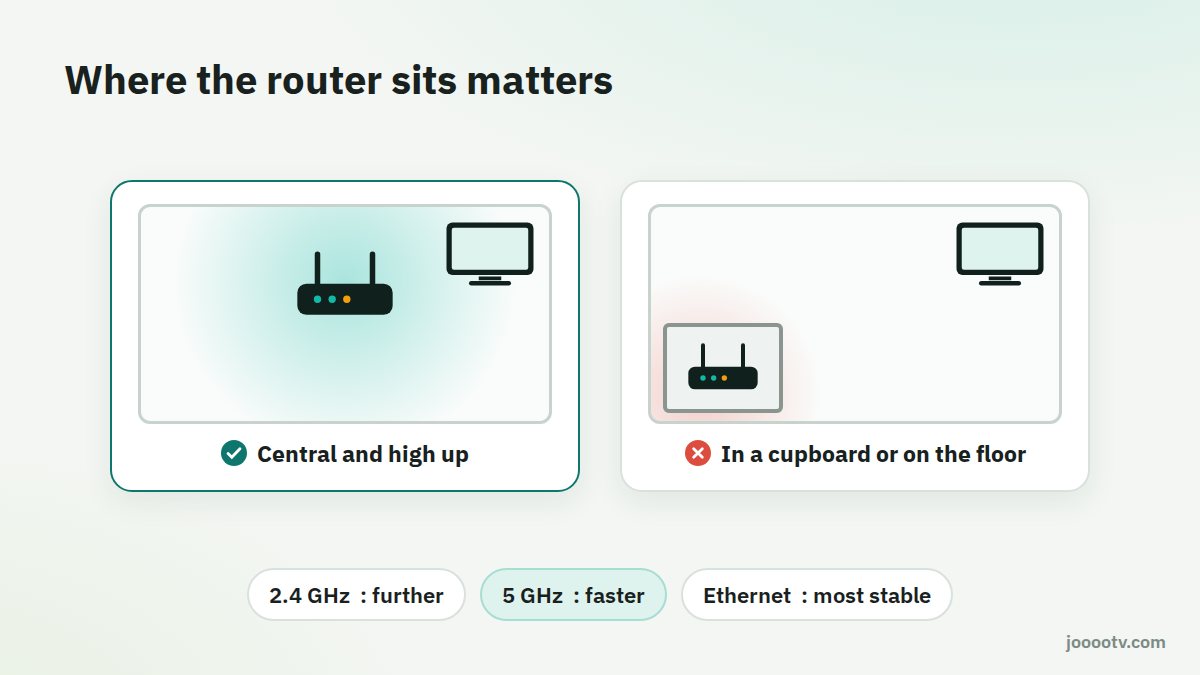
1. Where the router sits
- Central and high up: on a shelf or top of a cupboard, not on the floor or shut in a drawer.
- Away from metal and water: metal cabinets, fish tanks and big mirrors all weaken the signal.
- Away from the microwave and old cordless phones, which work on frequencies close to 2.4 GHz.
- Not baking in a closed cupboard. Routers run warm, and in a Gulf summer a stuffy cupboard makes it worse. An overheating router drops connections.
- Antennas: if your router has external ones, point some straight up and angle some sideways.
2. Pick the right band: 2.4 or 5 GHz?
| 2.4 GHz | 5 GHz | |
|---|---|---|
| Range | Further, better through walls | Shorter |
| Speed | Slower | Much faster |
| Congestion | Crowded in apartment buildings | Much less crowded |
| Best for | Devices far from the router | A TV in the same or next room |
If your router shows both bands under one name, many let you split them in the settings, for example by adding "-5G" to the second one. Put the TV on 5 GHz if the signal's decent.
3. Change a crowded channel
In apartment buildings, everyone's networks pile onto the same channels. Apps like WiFi Analyzer on Android show you which channels around you are packed.
- Open your router's admin page in a browser. It's usually 192.168.1.1 or 192.168.0.1, and the address and password are often on a sticker under the router.
- In the wireless settings, set the 2.4 GHz channel to 1, 6 or 11, whichever is least crowded.
- Save, and reconnect your devices.
4. A cable for what matters
If the TV or TV box is anywhere near the router, even a few metres away, an Ethernet cable is the strongest fix there is. No interference and no weak signal. A 10-metre cable is cheap and can run along the wall.
If a wall's in the way, Powerline adapters send the internet over your electrical wiring: one plug by the router, one by the TV. How well they work depends on the wiring in your home.
5. Repeater or mesh?
- Repeater: cheap and gets the signal to a far room, but often halves the speed.
- Mesh system: several units acting as one network, with smooth handover between them. Pricier, but the best answer for big houses or villas with more than one floor.
6. Small habits
- Restart the router once a week, or set a scheduled restart if it supports one.
- Update the router's firmware from its admin page. Updates fix performance and security issues.
- Change the Wi-Fi password if you suspect the neighbours are on it.
- If the router has QoS, give the TV priority.
After all this, measure the speed on the TV itself as explained in how much speed you need, and compare it with before.
Ready? This button always opens the watch site at its current address.
Open the watch site